Monday, January 19, 2009

Google FeedBurner Leaving Users out in the cold

FeedBurner Site Visitors statistics missing after migrating to Google FeedBurner.


Larger view of screen shot
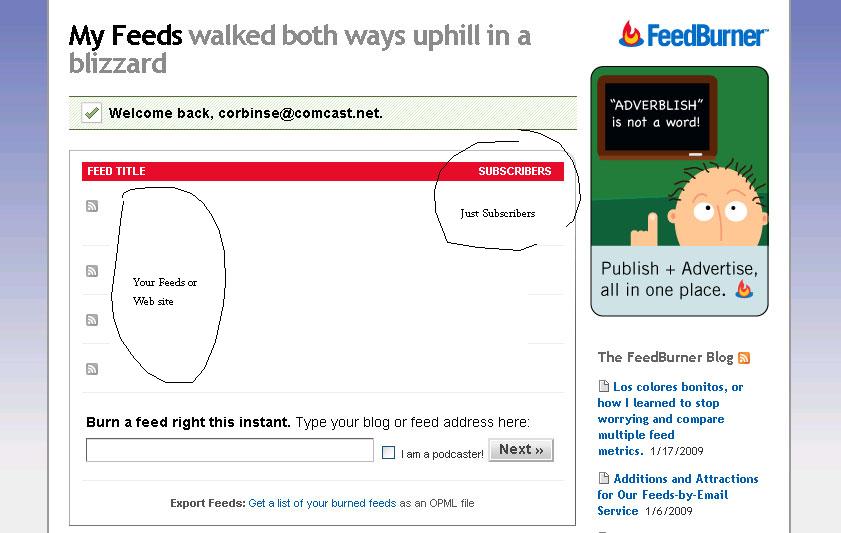
Over the weekend I noticed FeedBurner was migrating all of its user accounts to Google. I used FeedBurner on a daily basis because it would give me relatively real time statistics for visitors with the Pro and Fan option. These items were really useful to me because it would tell me how many hits I had on my sites as well as where they were coming from be it Google search or other web sites.

And this was real time information that I could use to help people that were reading my sites. Not only would it tell me from where they came from but also what pages they were looking at. Well after the 45 min migration on Sunday I was hit with this when I opened Google version of FeedBurner and immediately felt like they left us out in the cold.

Larger view of screen shot
new-feed-burner


** Warning if you utilize any of the items listed. Don’t migrate till it is absolutely necessary ***

Currently the new version of FeedBurner from Google has removed all of these nifty tools. There are no longer options for Site Stats the only thing you get are Feed Stats. Unfortunately I do not have screen shots for the previous stats to show.




Sunday, January 18, 2009

DigiMateIII required Photography Tool's

Digital Photography gadgets, Digital Photography photo storage, DSLR backup storage, Digital Photography toys
Now this is one really cool little item I think every person that is in to photography should have in their arsenal of toys. Its the DigiMateIII it will accommodate a 2.5” hard drive (laptop hard drive) right now I have 60GB drive in there. It reads .....

This post has moved to here click me to find the new home ;)

Water Photography

water4

High Speed Photography with Compact Fluorescent Light Bulbs (CFL's)


Another lazy Sunday spending some time with the family. Oldest had indoor soccer practice this morning and a brunch with the team. It was good to visit with some folks I had not seen in a while.

We tried to watch a movie this afternoon but did not read up on what it was, needless to say it was not even 5 minutes in to the movie and that got turned off. So we started to watch the ball games. It may be just me but unless the Broncos are playing (even then) I just can't sit and watch a game I have to be doing something else or I would fall asleep.

Grab my camera and in to the bathroom.. (lol not what you think.)


water2


I have taken some high speed shots be for and wanted to see what I could do with water again. Unfortunately the shots did not come out as well as I would have liked. Most of the drops were out of focus. All in all I took about 300 shots till I got the 6 I uploaded to flickr.

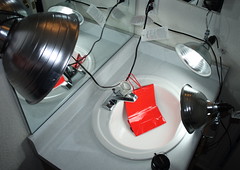
Here is the setup, I could not get my strobe's to recycle fast enough to take these kind of pictures and it does require a massive amount of light to get anything. Back to my trusty CFL's (compact florescent lights) 5500k 27w nvision bulbs in clamp shop lights available at your local Home Depot. Side note here things look clean when looking at them with normal indoor lights. Wow when you throw that much light on something you notice its not as clean as you think.

watersetup


The shots were taken at with an exif of:


Camera:
Canon EOS Digital Rebel XTi
Exposure:
0.001 sec (1/1000)
Aperture:
F/2.2 to 1.8
Focal Length:
50 mm
ISO Speed:
100
Exposure Bias:
0/3 EV
Flash:
Flash did not fire

Orientation:
Horizontal (normal)
X-Resolution:
350 dpi
Y-Resolution:
350 dpi
Software:
Digital Photo Professional

What do you think? Like I said I'm not as happy with these but it was worth the try.


Sunday, January 11, 2009

March of the Crunch Bell's

March of the Crunch1
Another off camera flash photography how to / diy
with the cegeekbook off camera flash photography beginner

I don't claim to be a good photographer by any stretch of the imagination the only classes I have taken were back in High School and I will not say how long ago that was.

Just another Sunday, everybody's bumming around the.......

This post has moved click here to find its new home.

Thursday, January 8, 2009

Need Help Terminal Server, Citrix, and Quickbooks

Here is the configuration, Windows 2003 with Terminal Server, Citrix and Quickbooks on the server among other applications we need to run the business. Clients are dumb terminals from NeoWare. Printers are old DOT Matrix (yeah I know come out of the dark ages)

*** side note we are still using applications that require win98 so that is also running on the server under virtual machines served up through Citrix as well. I know convoluted isn't it?***

Was sitting at the front desk on Wednesday after noon contemplating the Twitter issues I was experiencing waiting for the next pearl of wisdom to be tweeted, when from over the balcony I hear “Help”. Our administrative “do all” (she is not a secretary no way I would ever call her that she does way too much) is peering over the edge looking at me. We are trying to get a jump start on taxes this year so she is desperately trying to get the W2's printed out so we can file and get them out to employees as fast as possible. We know all to well that it has been a bad year for all and when sales are down so is everybody's paychecks this may help them get a bit of relief early.

Here is the problem this is the first year of using this version of Quickbooks on the server, version 2005 had no issues what so ever. 2008 on the other hand got finicky it would print one may be two W2's and then quit while the print spooler was showing jobs still in the queue. No matter what I did tweaks or tricks I could not get it to continue correctly. And the queue would not clear out no matter what I did till I took the printer off line and reset the print server (little linksys box with 2 lpt's and a usb port network connected). Thought it might be either the printer it self or the print server so I changed to another printer to no avail. Then hooked the printer directly to the Terminal still no good. By this time it is way past time for her to go home and I'm running out of patients so I decide we will wrap it up for the night and figure it out in the morning.

My final resolution was to bring my laptop up the next morning and connect it directly to the printer and print the W2's my self. This was not such an easy task either cause I rarely use it on my laptop so I had to go through all of the updates for the application and payroll updates. So it still took 2 hours to get through it.

Hope some one has some suggestions cause I don't want to have other issues with it this year.


Wednesday, December 31, 2008

I hate iTunes / iPod


Music transfer from iPod to PC


I Hate iTunes / iPod


Hate is a harsh word, but Apple has made it very difficult to change music players. Don’t get me wrong iTunes does have a nice layout, and I do like Cover Flow. But come on Apple prefers their .m4p layout over .mp3, my phone will not play .m4p and neither will any of my other music players.

So, another Christmas has come and gone and a new iPod nano has joined the family. Last year both the Wife and the oldest Daughter were blessed (cough, cough) with iPods. Wife received an iPod classic 80GB from yours truly and daughter a 4GB nano I guess 3rd gen (I think, am not so sure about the "generations" of these) from Santa (yours truly also). Things weren’t much of an issue last year because most everything was new, and did not have to transfer music or save stuff off of one. But this year when she received the new 16GB nano-chromatic I had some music to reclaim off of the old 4GB nano. Some of the music my daughter had purchased had gotten deleted off of the main computer some how and the only place it resided was on the nano.

Here is the dilemma how do I get her music on to the new iPod? I am not really familiar with iTunes, but I do know there is no option to go from iPod to iTunes their transfer is a one way street. Hop on the good old internet and search iPod to PC millions of hits (ouch! this is going to take a while), most of the programs are pay for use or if they are free or share ware they are riddled with spyware or viruses at best. After about the 10th page of search results on Google eureka found something worth looking at, it was a thread with good reports on a program SharePod with a link to www.download.com

You could also try Cucusoft iPhone/iTouch/iPod to Computer Transfer which is a Shareware title that also does a very good job of getting the music transfered.

Downloaded SharePod 3.8.7 unzipped it (ran virus scan) plugged in the iPod ran the .exe voila there is all of her music. This is a very simple program easy to use neat and clean, once the music shows in the left column you can just click on backup iPod and dump the entire contents in to a folder of your choice (no installer just run from where you extracted it to). After all of the music was ripped off plugged in the new iPod and there is the option to copy to iPod with the exception of a few little glitches everything loaded to the new one. And now I can place all of the music in the back up folder in to iTunes folder every thing is back to normal.

Tuesday, December 23, 2008

Ntldr missing

Ntldr Missing


Well in the last post I had a computer half way across the States infested with a nasty little bit of malware/spyware that was corrected with malwarebytes (great program). I also noted that that I had a bit of an issue with my personal (45 dollar laptop) rebooting with an NTLDR missing on boot. Well unfortunately I found out why I am getting this error. Apparently the hard drive ate it self, tis now toast, tango uniform, has seen its last huraaa. And so on and so on... well I do have most of the stuff backed up on an external hard drive but the most recent blog notes and some pictures are gone. I did try trusty SpinRite and it could not even start the disk check, also tried the Ultimate Boot CD 4.1.1 which has gotten me out of jam's be for. (this is a bootable linux iso cd that has a bunch and I mean a bunch of tools including NTFS tools check it out) But all of this to no avail, so I have consigned myself to giving up .. I am trying one last ditch effort to at least retrieve some of the info off by freezing it over night in my mini refrigerator at work. (secret place I keep my stash of Bluemoon) will have to see what happens in the morning if I can pull any info off will let you know.

Update: I have tried every thing in my tool kit of software, hardware, and even Hammer time!! To no avail the hard drive is DEAD.... Freezing the drive did nothing it will show up in Windows but showing I/O error. Well time to find a different hard drive for the laptop and start over with a ghost image I had be for .. THIS IS ANOTHER GOOD REASON TO ENSURE YOUR BACKUPS ARE GOOD... as I have said be for backup backup backup.

Lone Star Custom Lapel Pins

Lone Star Custom Lapel Pins
Veteran Managed Lone Star Pins are creators of custom lapel pins. We offer a free digital how to PDF on our site, Free Artwork, and quote. Contact us today for your proof and quote.

Share

Twitter Delicious Facebook Digg Stumbleupon Favorites More